
How to Use a Pattern Generator for Seamless, Custom Patterns
If you’ve ever had to source materials or digital assets, you know this scenario all too well. You can picture the perfect pattern with the exact colors and style that your project needs, but it only exists in your mind. The gap between what you can imagine and what’s actually available is where many creative projects stall.
Whether you need fabric, wallpaper, floor tiles, or digital backgrounds, you shouldn’t have to compromise with off-the-shelf options. With an AI pattern generator, you can quickly explore and visualize design ideas. Quillbot’s Pattern Generator is completely free to try.
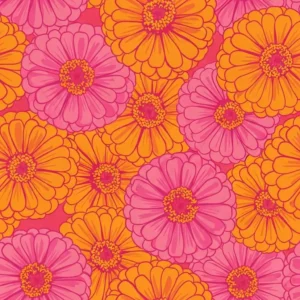
Apparel fabric pattern from Quillbot’s Pattern Generator
Key takeaways
- A pattern generator is an AI tool that transforms text prompts into seamless, repeating designs you can use for fabrics, wallpapers, and digital backgrounds.
- It lets you explore customized patterns for home decor, fashion, branding, events, and digital design instead of relying on off-the-shelf options.
- Strong results come from prompts that clearly define the subject, style, color palette, and composition of the pattern.
- Using a tool like Quillbot’s Pattern Generator is simple: enter a prompt, choose settings, generate your design, and download the finished pattern.

What is a pattern generator?
A pattern generator is an AI tool that creates a repeating visual design with perfectly seamless edges. You type a prompt about the colors and style you want, and the AI generates a digital file of a pattern, which you can use as a starting point for digital backgrounds or custom fabric, paper, flooring, or other materials.
In a seamless pattern, the edges are designed to flow into each other. If you repeat the image across a surface, there are no hard lines or mismatched borders, just a smooth, uninterrupted pattern that you can scale as large as you need.
Why use a pattern generator?
An AI pattern generator makes it possible for you to create one-of-a-kind designs in many situations.
- Home decorating: Design upholstery fabric, wallpaper, and flooring in any color palette, style, and theme you envision.
- Sewing: Create fabric prints with the designs and proportions needed for garments, quilts, or other handmade projects.
- Gifts: Customize products like socks, mugs, koozies, stickers, notebooks, phone cases with patterns tailored to the recipient or occasion.
- Branding: Develop a signature pattern and apply it across your branding design, from websites and packaging to labels and marketing materials.
- Presentations: Elevate your slides with custom backgrounds that make your content more engaging and memorable.
- Web and app design: Use patterns for website backgrounds, UI textures, landing pages, and interface accents.
- Events and marketing: Design cohesive flyers, banners, invitations, and event branding.
How to prompt a pattern generator
Prompting for patterns is slightly different from prompting for other types of images. You’re not just describing a scene but rather, a repeating texture and style. A strong pattern prompt includes these elements.
- Subject: What appears in the pattern
- Art style: Overall visual look and feel
- Color palette: Dominant colors and mood
- Composition: How the elements are arranged
Here are three examples of AI pattern generator prompts that include these elements.
Retro Memphis-style pattern
Prompt: Bold Memphis design-inspired seamless pattern with playful squiggles, dots, and geometric shapes; vibrant 1980s color palette; high contrast; dynamic scattered composition; graphic illustration style
Output from Quillbot’s Pattern Generator
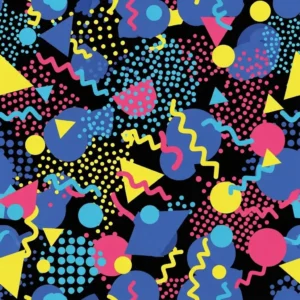
2. Tropical foliage pattern
Prompt: Repeating pattern of tropical foliage with monstera, palm, and banana leaves in a bold illustrative style; layered greens with deep shadow tones and bright natural highlights; dense overlapping composition; vibrant and energetic mood
Output from Quillbot’s Pattern Generator
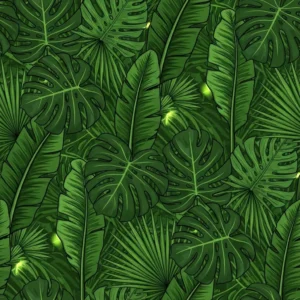
3. Vintage bicycle pattern
Prompt: Repeating pattern of vintage bicycles in a clean vector style; detailed linework with subtle texture; muted color palette of slate gray, turquoise, and cream; evenly spaced composition
Output from Quillbot’s Pattern Generator
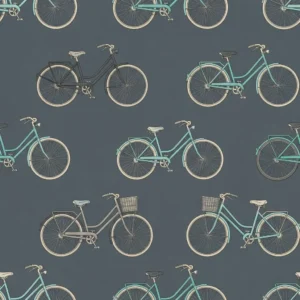
How to use an AI pattern generator
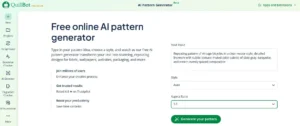
Using Quillbot’s Pattern Generator only takes a few steps:
- Type a detailed prompt.
- Select a style from the drop-down menu, like “Artistic” or “Fantasy,” or leave the style selection at “Auto” (especially if your prompt already describes the style).
- Select an aspect ratio from the drop-down menu. If you need a seamless pattern, 1:1 (perfectly square) is the way to go.
- Hit “Generate your pattern.” The tool will generate a PNG for you to download.
Quillbot’s Pattern Generator
Frequently asked questions about AI pattern generators
- How do you make a repeating pattern for fabric or wallpaper?
-
You can make a repeating pattern for fabric or wallpaper with an AI pattern generator.
Start by entering a prompt that describes the subject, visual style, colors, and overall composition. Include the words “repeating pattern” or “seamless pattern” in your prompt. The AI will generate a pattern that repeats across a surface.
After generating your design, preview how the image looks when it’s repeated side by side or top to bottom.
Quillbot’s Pattern Generator is completely free to try.
- What kinds of patterns can an AI pattern generator create?
-
AI pattern generators can create a wide range of designs, including geometric patterns, florals, abstract textures, and decorative styles, like Art Deco or watercolor. By combining different subjects, styles, and color palettes in your prompt, you can generate patterns for everything from fabric and packaging to digital backgrounds.
Quillbot’s Pattern Generator is easy to use, free to try, and available in a convenient creative ecosystem.
