Whether you’re creating happy Halloween images for social media posts, party invitations, menus, trunk-or-treat or party decorations, or kids’ craft stations, AI image tools like Quillbot’s free AI image generator can instantly realize your ideas for funny, cute, or spooky visuals.
Begin with a classic Halloween motif and experiment with different visual styles to create your own custom images.
Published on
October 16, 2025
by
Quillbot.
Revised on
March 12, 2026
Getting your album cover right is important because it shapes how listeners experience your music. AI album cover generators, such as Quillbot’s free AI album cover generator, can help you realize your creative ideas as part of the album cover design process.
Whether you’re designing a presentation, thumbnail, or social media post, creating an effective background is an essential part of digital content creation. AI background generators, such as Quillbot’s free AI background generator, make it faster and easier to bring your creative background ideas to life.
Published on
October 10, 2025
by
Kate Santoro, BS.
Revised on
June 1, 2026
A logo is one of the most important elements of any brand or business. You’ll use it everywhere, and it’s the image that people will most closely associate with your brand. So, a good logo should communicate the purpose and personality of your brand in a split second.
Since logos are so important, it’s critical you understand how to design a logo, whether you plan to do it yourself or hire someone to do it. If working with a designer, knowing what makes a good logo lets you collaborate in the design process. If you plan to design your own logo, it’s important to understand the theory behind logo design.
Thankfully, there are many tools nowadays that can kickstart your logo design process, like Quillbot’s AI logo generator. Use the logo generator to brainstorm ideas, create mockups, experiment with colors and composition, and work out what you like and don’t like in a logo.
Published on
October 10, 2025
by
Quillbot.
Revised on
June 1, 2026
Your logo helps to express the personality of your brand or business, setting the tone for how you connect with your customers or audience—so it’s worth investing the time to get it just right. Using an AI logo generator, such as Quillbot’s free AI logo generator, can jump-start your logo design process.
Published on
September 26, 2025
by
Kate Santoro, BS.
Revised on
January 29, 2026
Social media is one of the most popular channels for connecting with your target audience, but it can be challenging to maintain a steady posting rhythm. Designing fresh, high-quality graphics consistently can be time-consuming and expensive if you’re relying on stock photos or professional design tools.
That’s where an AI image generator comes in. The right tool can help you instantly create custom images tailored to your goal and style on each social network—without expensive licenses or advanced design skills.
Use Quillbot’s free AI image generator for social media posts today. Input your desired aspect ratio, preferred image style, and prompt to generate social media posts in seconds.
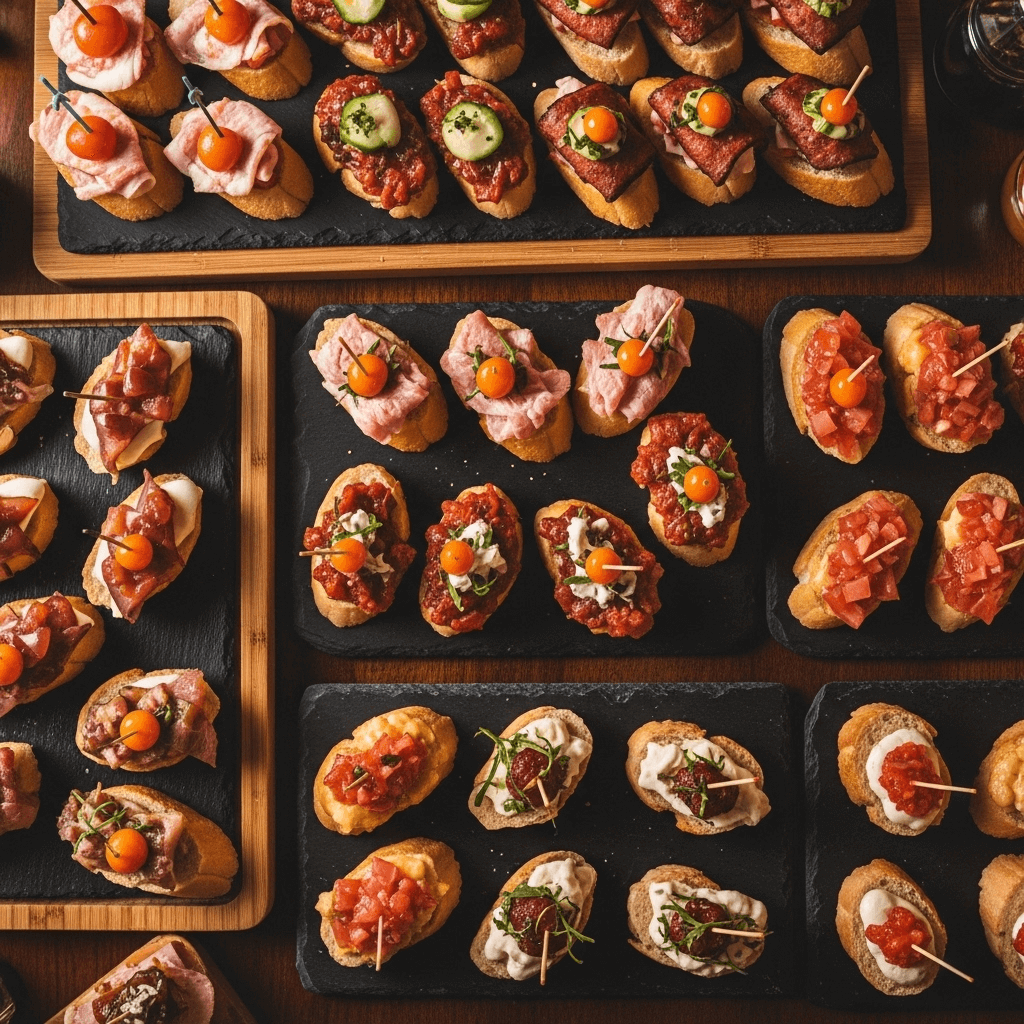
Using the AI image generator for social media posts examplePrompt: “Generate a square Instagram graphic for a travel page featuring Bilbao, Spain—use warm tones and an overhead shot of pintxos.”
If you’ve ever had to share handwritten notes with a classmate or upload a paper receipt for an expense report, you’ve experienced the challenge of extracting text from an image. While photographing text is quick and easy, the text itself isn’t searchable or editable. With an image to text converter, you can turn the text from image into words and numbers that you can search, copy/paste, and modify.
An image to text converter is a tool that uses optical character recognition (OCR) technology to analyze images and extract readable, editable text. Quillbot’s image to text converter does this in seconds, and it’s completely free to use.
Keep reading to learn more about how the image to text converter works and the OCR technology behind it.
Image to text converter examples An English teacher posts a creative writing prompt on the whiteboard every Monday for an in-class assignment. A student who is out sick emails the teacher for a copy of the prompt. The teacher photographs the whiteboard with his smartphone, runs the photograph through an image to text converter, and copies/pastes the prompt into a reply to the student’s email.
Meredith works in accounts receivable for a manufacturing company that wants to digitize several boxes of paper invoices and payment records from before 1995. Using an image to text converter, Meredith is able to quickly convert the documents into a convenient digital format.
Published on
September 14, 2025
by
Kate Santoro, BS.
Revised on
March 13, 2026
Quillbot’s AI image generator turns text into stunning photos, pictures, and artwork in seconds. Just describe the image you want to create, choose the style (e.g., anime, artistic, or realism), set the aspect ratio, and the AI image generator takes care of the rest!
Using the tool is easy; what might be more difficult is deciding how to use it. Here are 10 creative things you can do with Quillbot’s AI image generator to inspire you when trying the tool for yourself.
A hero image is a large, eye-catching image at the top of a website or landing page, designed to make a strong first impression. It sets the tone for your site, highlights your main message, and can even guide visitors toward taking action.
In this article, we’ll explore what a hero image is, showcase some of the best hero image examples, and walk you through a step-by-step guide to easily creating your own using Quillbot’s free AI image generator.
Most AI image prompts fail before the generation even starts because the description is too vague or under-specified, leaving too many decisions to the model.
An AI image prompt is the text instruction used to generate an image in an AI image generator, describing what the output should look like. When key details like lighting, mood, or composition are missing, the model has to fill in the gaps, which often leads to generic or inconsistent results.
This guide shows you how AI image prompts work and how to write them step by step, with real examples and prompt structures you can adapt for your own images.
“Bad” AI image prompt example“A cute dog in a city.”
This prompt leaves every decision to the AI tool: breed, setting, time of day, style, and mood. You might get a cartoon or a photo, daytime or night. With so little direction, the result is bound to be generic.
Prompting gets easier the more you practice. Quillbot’s AI Image Generator is a good place to start.
Key takeaways
An AI image prompt is a text instruction used to generate an image in an AI image generator, describing the desired visual output.
AI image prompts work best when they are clear and structured, not vague or conversational.
Include key elements like subject, style, lighting, and composition for more accurate and consistent results.
Use negative prompts and iteration to reduce unwanted artifacts and progressively improve results.