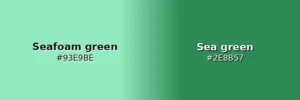
Seafoam green is a minty, aqua-leaning green that’s typically lighter, softer, and more pastel than sea green, which tends to be richer, more saturated, and more distinctly green.
Identify the hex code for exactly the shade of green you’re looking for using Quillbot’s free online color wheel tool.
Seafoam green is a light shade of green, so if you’re looking for a dark seafoam green, try searching for shades like teal, blue-green, petrol, dark cyan, or pine green.
You can use Quillbot’s free online color wheel to find a hex code for a dark version of seafoam green: just enter the code #93E9BE and use the pointer on the outer wheel to make it darker.
Military uniform greens are often referred to as olive green. “Olive drab” describes a dull, muted olive-green shade commonly used for military uniforms.
If you need a shade of military green for your project, enter the hex code #6B8E23 for “olive drab” into Quillbot’s free online color wheel and adjust the pointers until you get the shade you’re looking for.
Complementary colors provide high contrast. For cohesive pairings, try olive green’s analogous colors (its neighbors on the color wheel), which are muted, earthy yellows and greens.
To find a color’s color harmonies on the color wheel, enter its color code into Quillbot’s free online RGB color wheel and select one of the options from the color harmony drop-down list.
Emeral green is a common misspelling of emerald green.
You can use Quillbot’s free color palette generator to help you create an emerald green palette. Just upload an image with an emerald green color scheme, and the tool will identify its hex codes, which you can use as a starting point for your palette.
Yes, sage is green. It is a muted, gray-green shade of green.
The term sage green covers quite a broad range: cooler sages can have strong gray undertones (sometimes with a hint of blue), while warmer sages lean more toward olive.
If you want to identify the colors used in an image with a green palette, upload it to Quillbot’s free online color palette generator to extract the color codes of its color scheme.
If you’re looking for a light sage color, you could try colors like moss green (#8A9A5B), olive green (#808000), or pistachio (#93C572), which are all close to sage green on a color wheel such as Quillbot’s free online color wheel.